7 Checks for Creator Publishing Failure Support Cases
Collect seven exact checks to separate creator publishing failures from slow processing, hidden posts, account limits, and service incidents.
The short answer
Confirm the account and destination, name the failed stage, identify the source asset, record the client and connection, distinguish active processing from a stopped job, verify visibility and schedule settings, then check service status and hand off a compact evidence record. Keep platform examples tied to the named product and treat every message as evidence, not proof of cause.
A creator may say that a post will not publish. That report can describe several different events. The publish control may be unavailable. An upload may fail at once. A file may still be processing. A post may exist as a draft, private item, or scheduled release. Support should name the stage before suggesting a cause.
Official help from YouTube, Patreon, and Vimeo covers account or channel limits. It also covers file errors, slow jobs, post choices, and service status. These product examples support a clear intake record. They do not create one rule for every creator site.1234
Use the seven checks for one publish attempt and one target. Preserve the original work. Remove private details from screenshots and notes. Record unknown values as unknown. Choose the next safe owner and test. Do not blame the creator, file, network, or site.
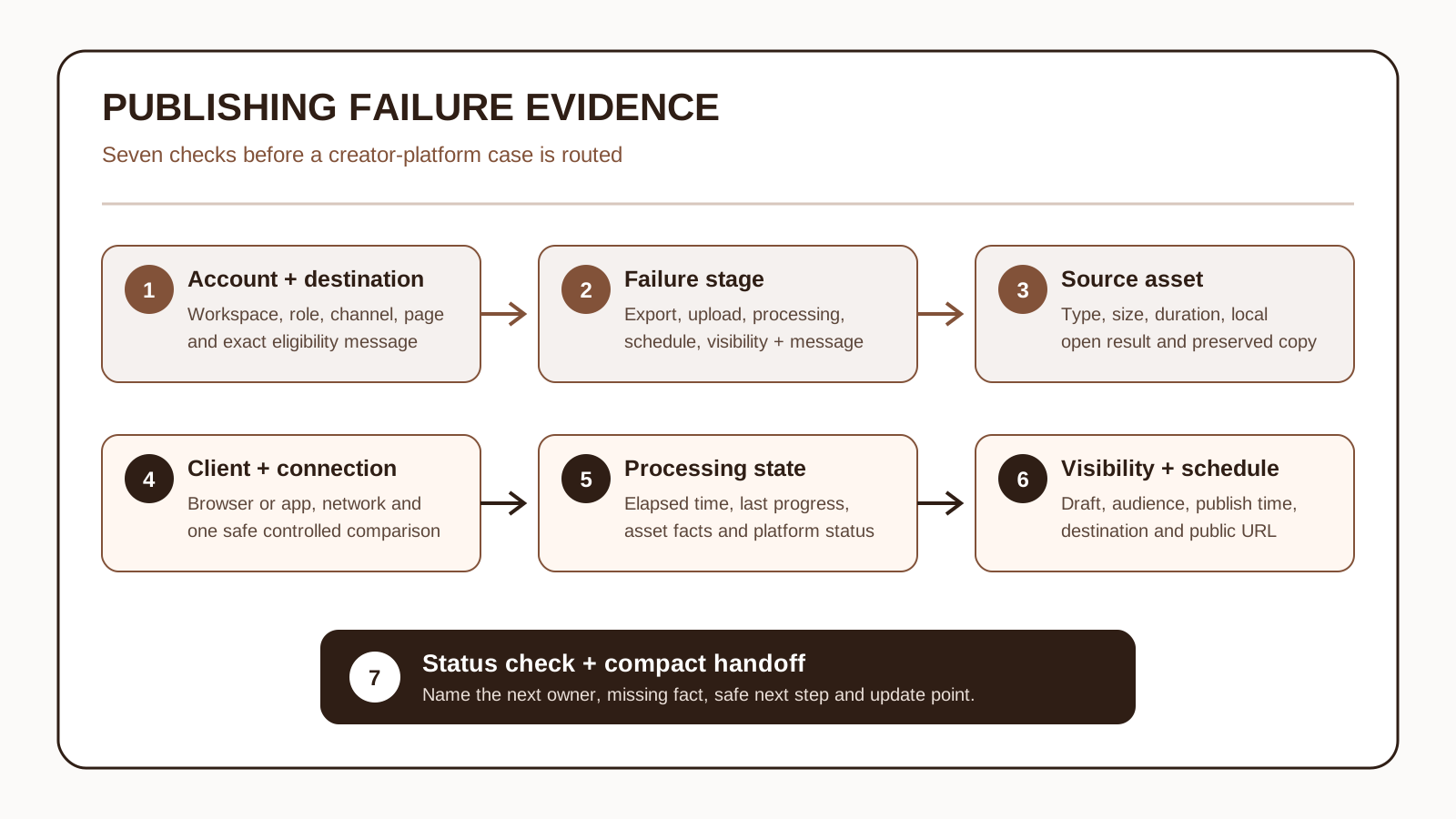
1. Confirm the account, role, and publishing destination
Record the signed-in account or workspace without copying credentials. Name the chosen channel, page, feed, or member area. Add the creator's reported role. Say if the publish control is visible, disabled, or replaced by an exact message.
YouTube lists upload messages tied to channel status and account safety settings. It also lists limits and other product rules. Copy the exact message and current target. Do not infer a strike, access problem, or policy ruling. The site must show that fact for this account.1
The creator may run several brands or pages. Confirm which one should receive the post. An upload to the wrong page is a routing error. It does not prove that the first page can publish.
Bind the case to the exact workspace, channel, page, or membership destination before checking the asset.
- When it helps
- When the publish control is missing, the creator has several destinations, or an eligibility message appears.
- What to watch
- Account context improves routing, but support must avoid collecting passwords, recovery codes, or unrelated profile data.
2. Capture the exact failed stage, message, and time
Write the last completed action. Then note the first result that differs from the creator's goal. Copy the full message. Add the UTC time, client, destination, and short repeatable steps. Say whether the result happens every time or only sometimes.
YouTube documents distinct messages for file, network, browser, channel, security, size, and daily-limit conditions. Patreon also separates drafting, publishing, and scheduling choices. These examples show why 'publish failed' is too broad for a support record.13
Treat the message as an observed fact. Do not turn it into a root cause. Do not reuse a fix from another product. The message may hold a private title, email, or account ID. Hide that value but keep the useful error text.
Separate authoring, export, upload, processing, scheduling, and public visibility before choosing a next step.
- When it helps
- When one report could mean an export error, rejected upload, stalled process, missed schedule, or hidden post.
- What to watch
- Exact timestamps and messages add intake work, but they prevent later teams from investigating the wrong stage.
3. Identify the source asset without collecting more than needed
Record the file type and rough size. Add its length or shape when useful. Say if the original opens on the creator's device. Add the export app and preset if one was used. Keep the original unchanged and label each test copy.
YouTube and Vimeo both split file or format issues from other upload failures. Their accepted formats and limits apply to each product. Use current help for the named site. Do not turn one site's rule into a rule for all creator files.14
Start with file facts, a redacted image, or a known-good sample from the product. Do not ask for private work by default. That includes an unreleased video, paid post, client file, or full project. Use a secure support route only when the case truly needs it.
Describe one preserved file or post body closely enough to compare attempts without requesting private work by default.
- When it helps
- When an upload rejects at once, different files behave differently, or the creator exported the asset from another tool.
- What to watch
- A privacy-minimizing record may not reproduce every asset detail, so a secure specialist handoff may still be needed.
4. Record the client, connection, and one controlled comparison
Record the browser or app name and version. Add the device type, link type, and any product-approved add-on context. Note if the client shows progress, an instant rejection, or a retry control. Do not collect unrelated browser or device history.
Vimeo's upload guide covers the link, browser add-ons, firewalls, file format, and later work. YouTube also names browser and network states in some messages. These facts can guide one test. They do not prove that the network or safety tool caused the event.41
Choose one approved test. You might use the same saved sample in a current browser. You might use the same client on a known stable link. Keep other facts fixed and record the result. Never ask a creator to disable safety controls or expose private work.
Change one low-risk variable in an approved test while preserving the original attempt and its evidence.
- When it helps
- When the same destination works for one client or network but not another.
- What to watch
- One-variable tests give clearer evidence, but they may not reproduce an intermittent platform or processing event.
5. Distinguish slow processing from a stopped job
Record when the upload started. Add the last progress change and current stage label. Add the source file's size, format, length, and quality when they matter. Did the creator close the client? Did the file change after the attempt began? Record each answer.
YouTube says upload time can vary with file size and format. Link quality, traffic, and media quality can matter too. Vimeo also splits a slow upload from later processing. Neither page gives one safe timeout for every product or file.24
Do not restart a job blindly. First capture its state and check the product's current instructions. A second upload can create duplicates or erase the best timing evidence. The product may offer a safe resume action. Record if it was used and what changed.
Record elapsed time and the last real progress state before restarting or declaring the publication stuck.
- When it helps
- When progress appears frozen, an upload finished but processing continues, or the creator is unsure whether to retry.
- What to watch
- Waiting preserves evidence and avoids duplicates, but an actually stopped job may need a product-specific recovery step.
6. Verify draft, audience, schedule, and visibility settings
Record the item's current state. It may be a draft, public, private, unlisted, scheduled, member-only, or limited to another group. Add the chosen time zone and post time if a plan exists. Confirm the target. Copy the post URL when the site gives one.
Patreon describes drafts, publishing, post times, audience access, previews, and alert choices. Those settings belong to Patreon. Other sites may use different labels. Keep the exact current words from the site being supported.3
Compare the expected group with the chosen group. Do not change access, time, or alerts without the creator's approved process. A private post needs a different owner. A file that never uploaded needs another route.
A completed creation flow can still leave content unpublished or unavailable to the expected audience.
- When it helps
- When publishing appears successful but followers cannot find the item or a scheduled post did not appear when expected.
- What to watch
- Visibility detail can explain a missing post, but support must not expose paid or private content while testing.
7. Check platform status and hand off a compact evidence record
Check the site's current official status source when one exists. Record the service, part, check time, and shown state. A broad outage can change the next action. A green page does not prove that the account, file, or client is healthy.
Vimeo's help points users to its status page. It asks for facts about the failure and file. It also asks for tried steps and results when support is needed. Use that as a Vimeo example. Do not promise that every site has the same status or support route.4
End with the next owner and safest next step. Add one missing fact and an update point. The owner may be account support, creator tools, or upload transport. It may be media processing, post settings, policy support, or incident response. Do not promise a fix time. Do not publish again without authority.
Separate a possible service incident from one creator's case, then name the next owner and missing fact.
- When it helps
- When the intake is complete enough to decide between a product setting, account route, technical escalation, or incident path.
- What to watch
- A compact handoff reduces repeat questions, but it must keep uncertain causes and unavailable facts clearly labeled.
Putting it into practice
Fictional example: a creator reports that a video did not publish. Support confirms the planned workspace and channel. The upload ended, but the item has stayed in processing for 42 minutes. The case records the stage, time, browser, link type, file type, size, and length. It also keeps one redacted progress image.
The original stays unchanged. A sample from the product works in the same supported browser. The team records that test without blaming the creator's file. The planned audience and post time are correct. Current status shows no broad outage. That narrows the route but does not prove the service is fault-free.
The handoff goes to media-processing support. It includes the last progress state and file facts. It also includes the safe test, missing job ID, and next update point. Seven clear checks turn a vague complaint into a useful record. They do not expose private work or present a symptom as a cause.
How this guide was researched
Drafted from the approved S059-L01 research record and reviewed against four current official YouTube, Patreon, and Vimeo help pages opened on 30 October 2026. Material product claims carry source IDs and contextual links. The seven-check route and worked example are original editorial guidance. No creator account, private asset, unpublished post, product subscription, or support case was accessed. Separate factual, editorial, product, originality, visual, accessibility, asset, layout, SEO, and byline checks passed; publisher/legal, site, deployment, live, crawler, and rollback gates remain pending.
A seven-check creator-publishing evidence trail that separates account, upload, processing, schedule, visibility, and incident routes before support chooses an owner.
Editorial standardsSources
- Common uploading errors
Checked 30 October 2026 · YouTube documents product-specific upload messages covering file, network or browser, account or channel, security, size, and limit conditions.
- Video stuck during upload
Checked 30 October 2026 · YouTube explains that upload duration can vary with file characteristics, connection quality, traffic, and media quality.
- Posting to your Patreon
Checked 30 October 2026 · Patreon documents product-specific draft, publish, schedule, audience, preview, and notification choices.
- Troubleshooting: Failed or slow video uploads
Checked 30 October 2026 · Vimeo describes product-specific upload and processing checks, service-status review, and useful evidence for a support handoff.